Nuxt 4.7: I tested what's new and why it's worth upgrading


I broke the reviews API of a small Nuxt shop on purpose. Without protection, the whole page turned into a 500 error. With an experimental option in Nuxt 4.7, only the reviews block showed an error, and the rest of the shop kept working.
That was one of the tests I ran on the version released on November 23, 2026, about seven weeks after Nuxt 4.6. Nuxt 4.7 also moves errors from the terminal into the page, validates runtimeConfig before the server starts and fixes three security issues. On the starter project, the server output got 43% smaller. I think it's worth upgrading, but I'd keep two features out of production for now: WebMCP, which lets AI agents use your site, and Nitro v3, the base of Nuxt 5.
The official release post is quite technical, and I don't find it easy to follow, so I tested things myself. The screenshots come from those tests, the docs and GitHub. The shop's interface is in Portuguese. If you'd rather watch, the video above covers the main changes, also in Portuguese.
Nuxt 4.7 features at a glance
| Feature | Status | Would I use it now? |
|---|---|---|
| Problems inside the page | on by default in development | yes |
typeCheck: 'dev' | opt-in | yes |
Schemas in runtimeConfig | opt-in | yes |
NuxtErrorBoundary on the server | experimental, off by default | yes, after testing |
staticRoutes | experimental, off by default | yes, after testing |
| WebMCP | experimental, off by default | only to experiment |
| Nitro v3 | highly experimental | only on a branch |
Errors and warnings inside the page
In the browser, my shop looked perfect. In the terminal there was a Vue warning, a TypeScript error and a link to a page that doesn't exist. Who watches the terminal all day?
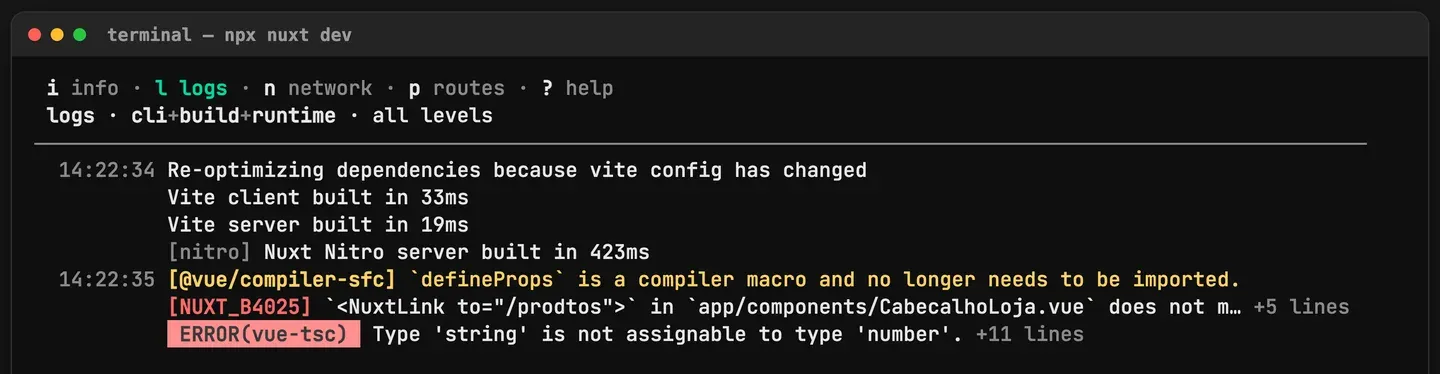
In Nuxt 4.7, all of that goes to a badge in the corner of the page with a problem count. Clicking it opens a drawer with the file, the code around the problem and a button that opens your editor.
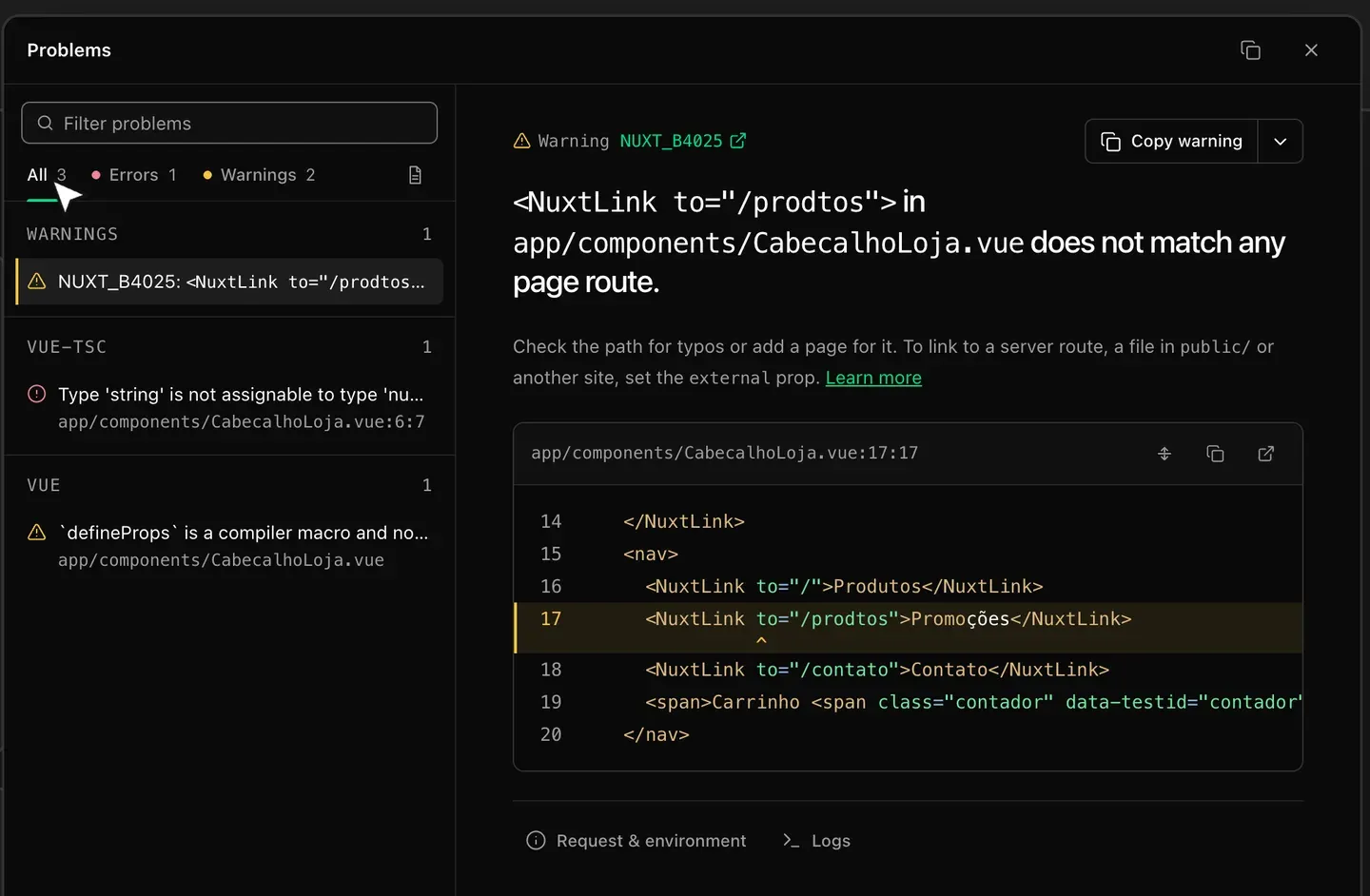
Warnings from Vue and Nuxt show up by default. To include TypeScript errors, turn on typeCheck. You can now keep it in development only, so it doesn't run again during the build:
export default defineNuxtConfig({
  typescript: {
    typeCheck: "dev" // also accepts true or 'build'
  }
});
NUXT_B4025: a link to a page that doesn't exist
Nuxt knows the routes in your project, so it now checks the static to of every <NuxtLink>. In the shop I typed /prodtos and got NUXT_B4025 before anyone could hit a 404. If the link points to a server route or a file in public/, add the external prop.
NuxtErrorBoundary now catches server errors
In production, an API can go down at any moment. My shop loads reviews from a separate API. When it failed during server rendering, visitors got a 500 and never saw the product, which had nothing wrong with it.
<NuxtErrorBoundary> already existed, but it only caught errors in the browser. With ssrErrorBoundary, it catches both:
export default defineNuxtConfig({
  experimental: {
    ssrErrorBoundary: true
  }
});
<NuxtErrorBoundary>
  <Reviews />
  <template #error="{ clearBoundaryError }">
    <p>Reviews unavailable</p>
    <button @click="clearBoundaryError">Try again</button>
  </template>
</NuxtErrorBoundary>
I broke the reviews API again and the response went from 500 to 200. The page opened with the message where the reviews would be, and the rest of the shop kept working.
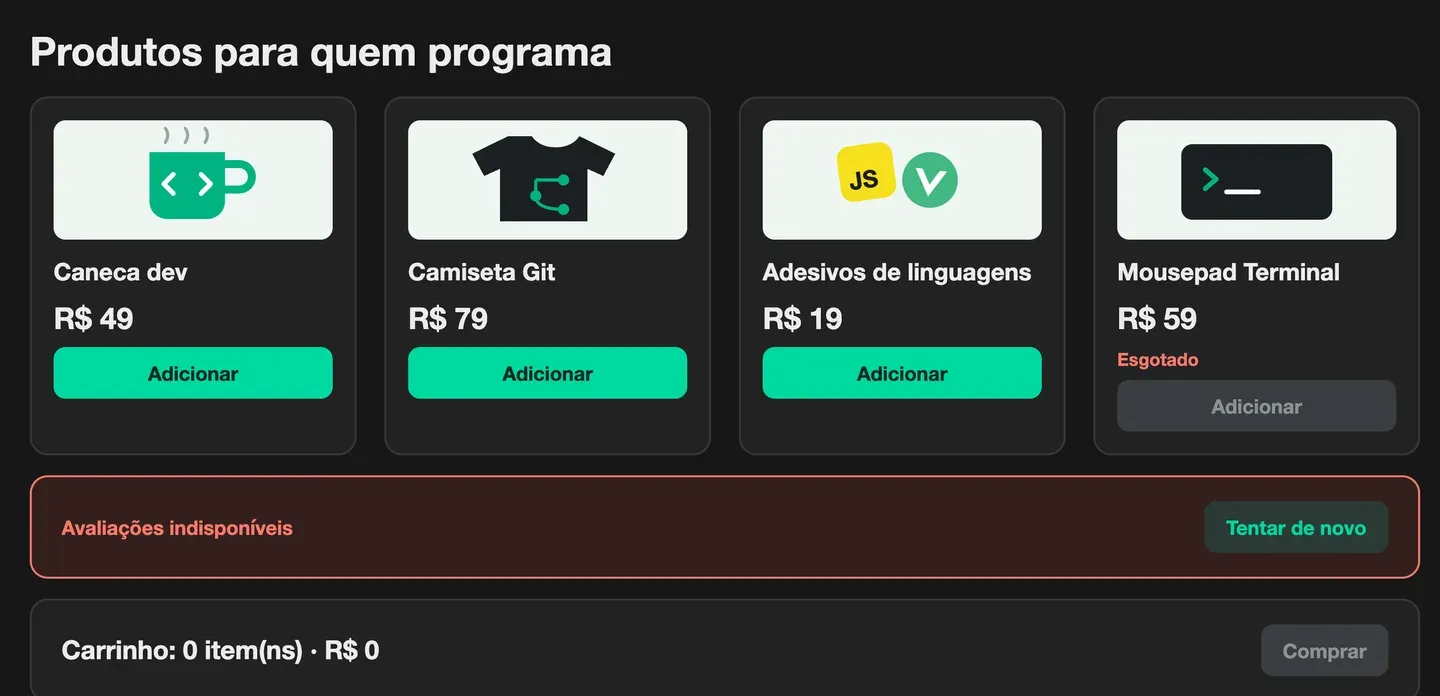
There's also a retry-on-client prop, which tries to render the content again in the browser. It replaces <NuxtClientFallback>, now deprecated.
How to validate runtimeConfig with Zod
Sometimes you deploy, the site opens fine, and the first customer who tries to pay gets an error because nobody set the payment key on that server.
In Nuxt 4.7, runtimeConfig values accept a Standard Schema, such as one from Zod, Valibot or ArkType:
import { z } from "zod";

export default defineNuxtConfig({
  runtimeConfig: {
    apiSecret: z.string(),
    public: {
      mode: z.enum(["preview", "production"]).default("production")
    }
  }
});
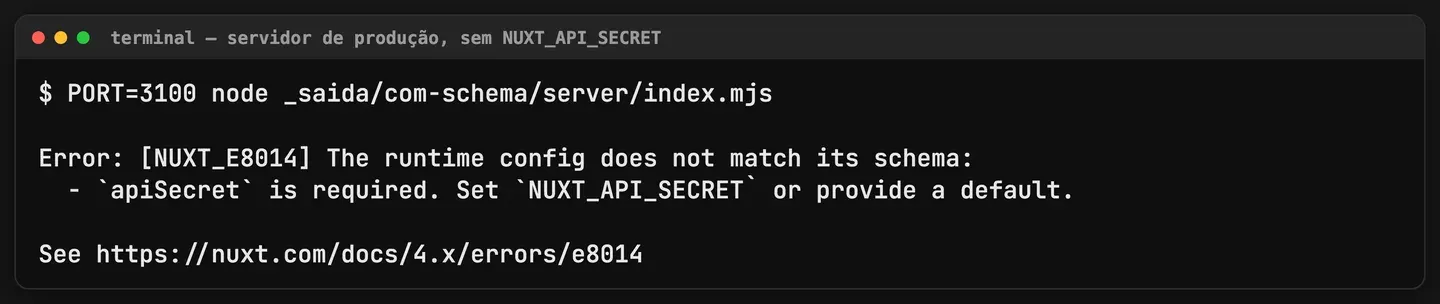
I started the server without the key and it refused to boot. The NUXT_E8014 error says what's missing and lists every problem at once, so you find out at deploy time, before a customer has their card in hand.
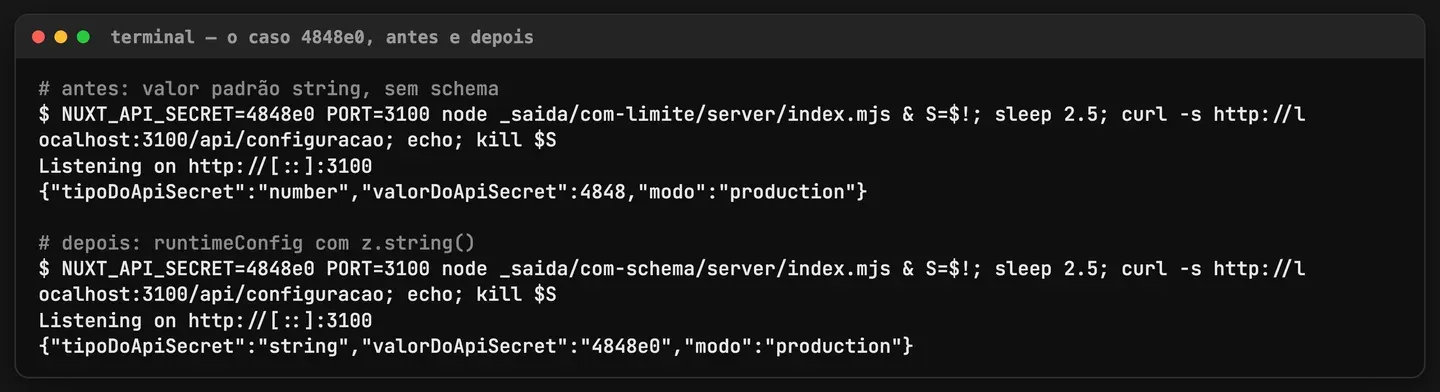
Schemas fix types too. Nuxt used to guess whether a variable was text or a number. In my test, the key 4848e0 became the number 4848. With z.string(), it stayed a string.
WebMCP in Nuxt 4.7: letting AI agents use your site
Today an agent has to read the screen or the HTML, work out what's a button and try to reach a result. Sometimes it clicks the wrong thing. WebMCP is a proposed browser API where the page itself says which actions it offers, such as adding to a cart.
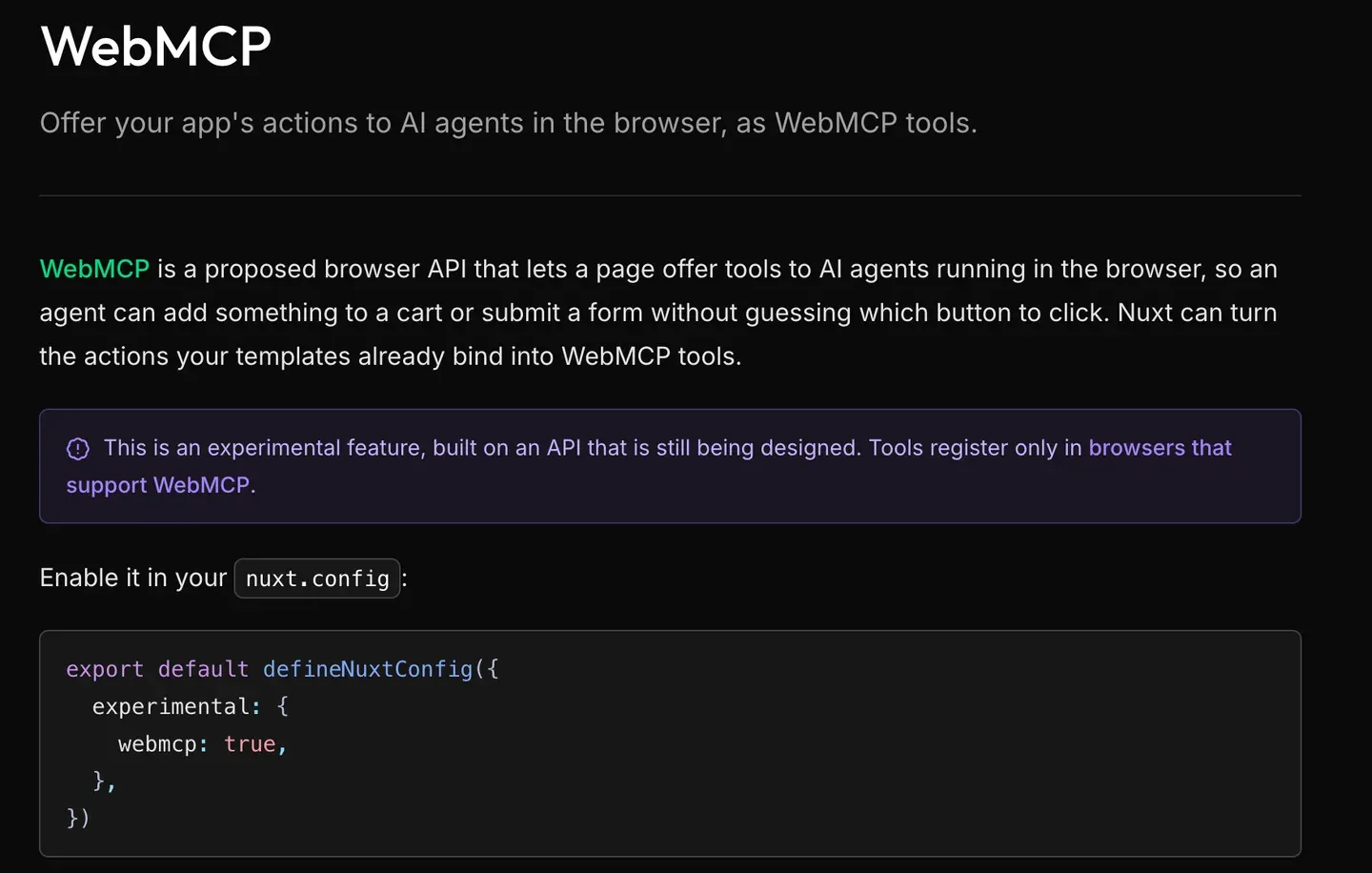
I set experimental.webmcp: true and added a comment with @tool to a function the shop already had. In English, it looks like this:
<script setup lang="ts">
/**
 * Add a product to the cart. Use when the user wants to buy something.
 * @tool
 */
function addToCart(sku: string) {
  cart.value.push(sku);
}
</script>

<template>
  <li v-for="product in products" :key="product.sku">
    <button :disabled="!product.inStock" @click="addToCart(product.sku)">
      Add
    </button>
  </li>
</template>
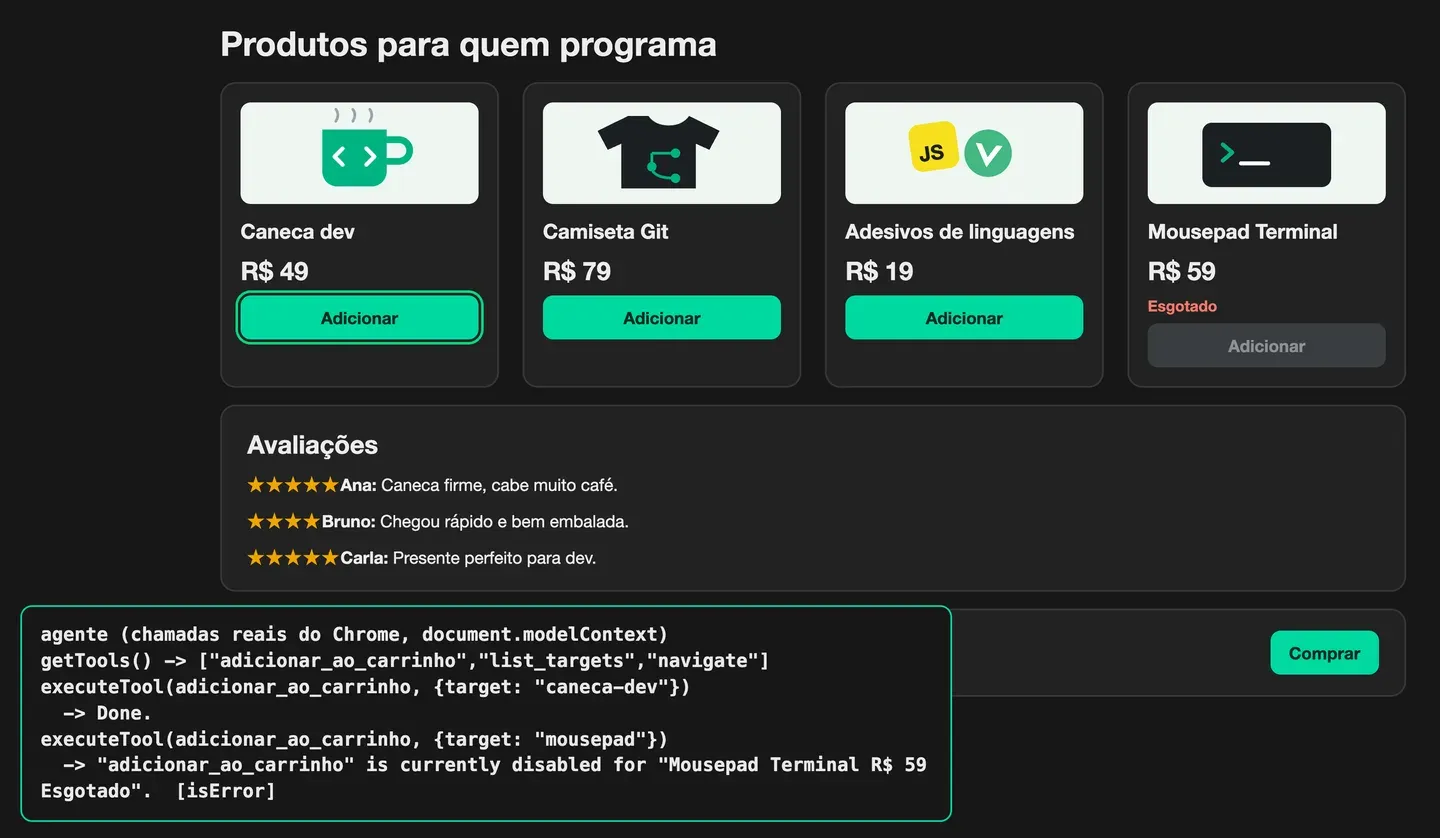
Nuxt turns that function into an add_to_cart tool. The template sets the limit: the agent can only pick products on the page, and a disabled button blocks the action too. In forms, the agent fills in the fields and goes through the same validation as anyone else.
I tested it in Chrome 158 with the WebMCP feature enabled. A script of mine called the tool, with no AI model behind it. The mug went into the cart and the sold-out mousepad was refused:
To try it locally, turn on chrome://flags/#enable-webmcp-testing. In browsers without support, the site works as usual. I wouldn't ship it yet, because the spec is still changing. With or without WebMCP, validate everything on the server.
Performance: Nuxt 4.6.4 vs Nuxt 4.7
These numbers come from the Nuxt team's own tests:
| Measurement | 4.6.4 | 4.7.0 | Change |
|---|---|---|---|
| Installed packages, starter | 523 | 473 | -50 |
| Server output, starter | 2.17 MB | 1.23 MB | -43% |
| Initial page load, starter | 80.4 kB | 66.3 kB | -18% |
| SSR, starter | 245 req/s | 292 req/s | +19% |
SSR, page with 1,000 <NuxtLink>s | 88 req/s | 218 req/s | 2.5x |
| Hydration, Nuxt UI landing page | 757 ms | 644 ms | -15% |
| Total blocking time, Nuxt UI landing page | 276 ms | 180 ms | -35% |
Nobody has a page with a thousand links, but it shows how much lighter the component is for the server. Not everything improved: nuxt build got about 6% slower on the starter and 7% faster on their large app.
How to enable staticRoutes
By default, the server rebuilds the whole route structure on every request, in case a route was added while the site was running. It's like a restaurant printing a new menu for every customer who walks in. With staticRoutes, it builds it once and reuses it:
export default defineNuxtConfig({
  experimental: {
    staticRoutes: true
  }
});
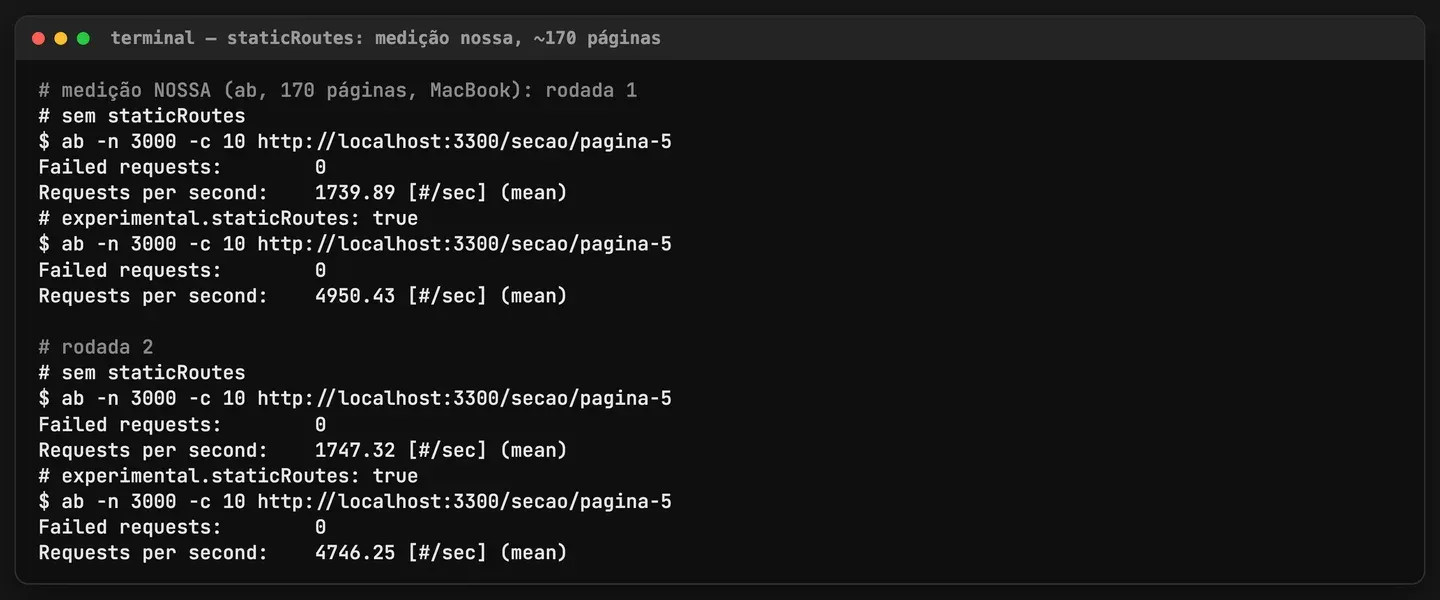
On an app with about 170 pages, the Nuxt team went from 890 to 1,976 requests per second on a small page. My own test, also with 170 simple pages, went from about 1,740 to 4,850. The machines and apps are different, so don't compare absolute values or expect the same gain in every project.
If your routes come from the pages folder, go ahead and test it. You just can't call addRoute(), removeRoute() or clearRoutes() at runtime.
Nitro v3 on Nuxt 4: a piece of Nuxt 5
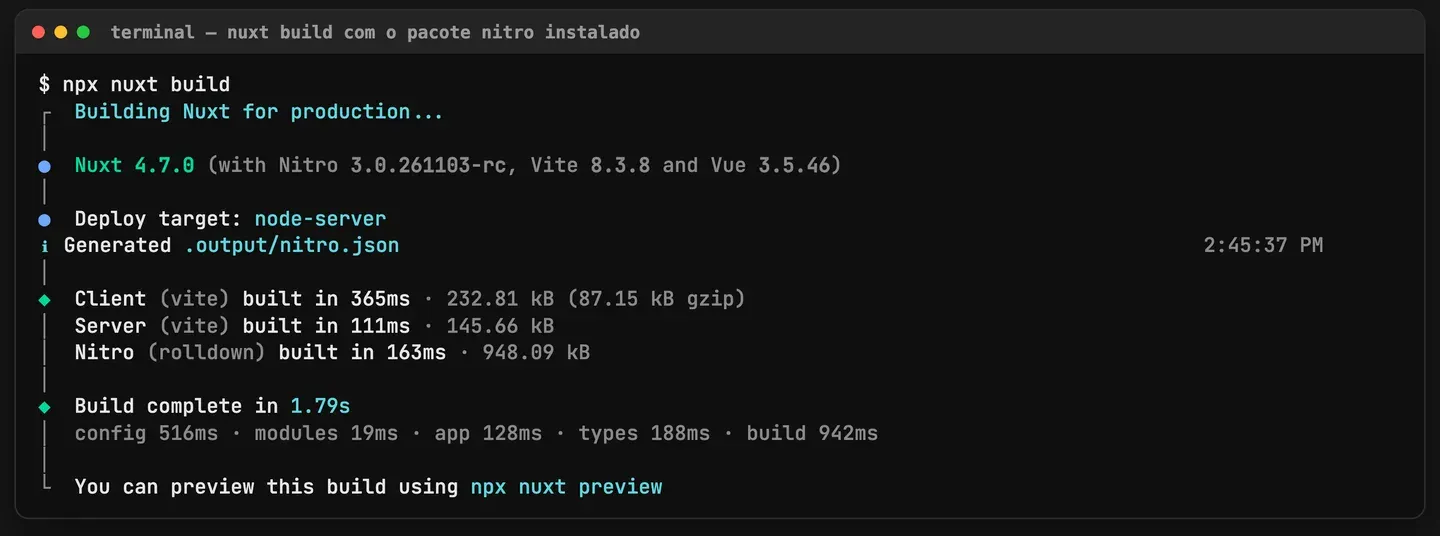
Nitro is the engine that runs the routes in your server folder, and version 3 is the base of Nuxt 5. By default, Nuxt 4.7 stays on Nitro v2 and only uses Nitro v3 if you install the nitro package:
npm install nitro
At build time, Nuxt sees nitro in your package.json and uses the new version. If something breaks, remove the package. My shop built fine with Nitro 3.0.261103-rc:
Nuxt also turns on a compatibility layer that works like a plug adapter: much of your old code keeps running on the new server. To find what still depends on it, set nitroLegacy: false.
Watch your route rules: in Nitro v3, /blog/* also applies to /blog/2026/hello. Every package your server imports also has to be in your package.json.
On the 170-page app, the Nuxt team measured 33% more requests per second on the home page (926 to 1,236). But Nitro v3 is still a release candidate, and they ask you not to use it in production.
Security: the three issues fixed
The one that caught my attention is GHSA-jxc9-w3j6-pwp2, rated moderate. Picture a site that caches everything except the account page:
export default defineNuxtConfig({
  routeRules: {
    "/**": { isr: 60 },
    "/account": { isr: false }
  }
});
The page stayed out of the cache, but the _payload.json with its data could still be stored. In some cases, a CDN could serve one user's data to another.
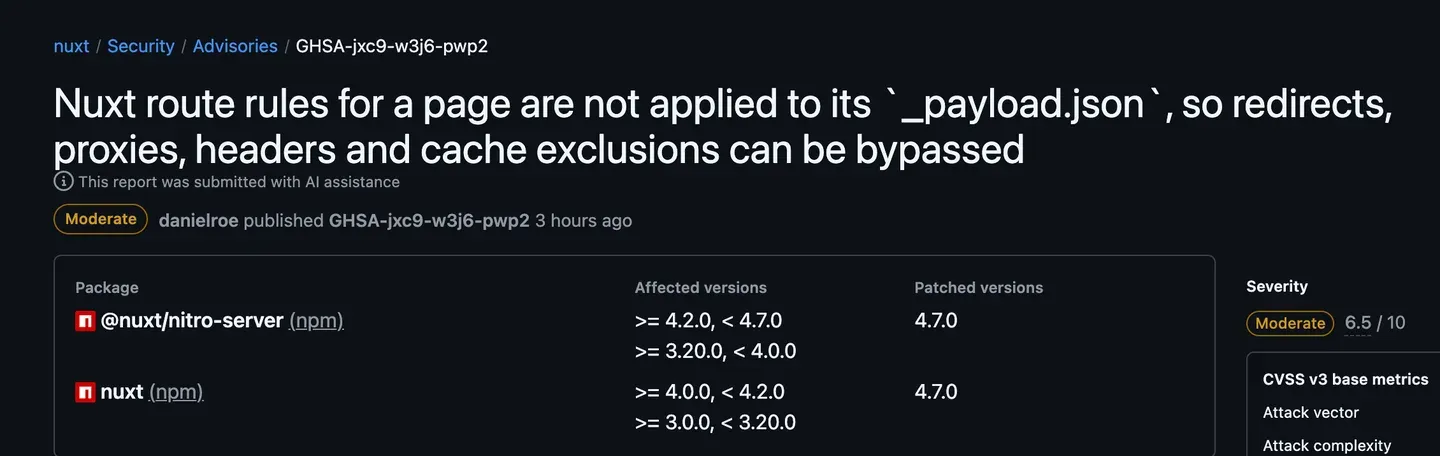
If your project caches pages like that, upgrade and then purge your CDN cache. The new version doesn't remove what is already stored there.
The other two are GHSA-vrh2-cfcx-c3fg (moderate), where repeated or encoded slashes bypass rules on catch-all routes, and GHSA-h5xj-x893-p5f7 (low), which affects development servers exposed to a network.
Nuxt 3 is affected too: the advisories list 3.x versions and, on November 24, 2026, showed no fix for that line. Nuxt 3 reached end of life on July 31, 2026, so the way forward is migrating to Nuxt 4.
How to upgrade to Nuxt 4.7
npx nuxt upgrade --dedupe
Before you ship, check these points:
- Nuxt 4.7 needs Vue
^3.5.46. The command above updates both. - DevTools no longer comes installed. If you use it, add
@nuxt/devtoolsto yourdevDependencies. @nuxt/rspack-builderis deprecated in favor of@nuxt/rsbuild-builder.- Scripts that read
globalThis.$fetchoutside your app code may needexperimental.globalFetch: true.
Should you upgrade to Nuxt 4.7?
I say yes, mainly for security and performance. Errors in the browser and runtimeConfig validation also make Nuxt more solid day to day. Upgrade, run your tests and try staticRoutes.
WebMCP and Nitro v3 are cool, but they're still unstable. Try them on a branch. I wouldn't recommend either for a production site right now.
For another recent addition, read about Vue Vapor Mode in Nuxt 4.6.
Sources
Checked on November 24, 2026.
- Nuxt 4.7 announcement (Nuxt, 2026)
- v4.7.0 release (GitHub, 2026)
- WebMCP in the Nuxt docs (Nuxt, 2026)
- staticRoutes pull request (GitHub, 2026)
- Upgrade guide and Nitro v3 testing (Nuxt, 2026)